JG Mechanic Script

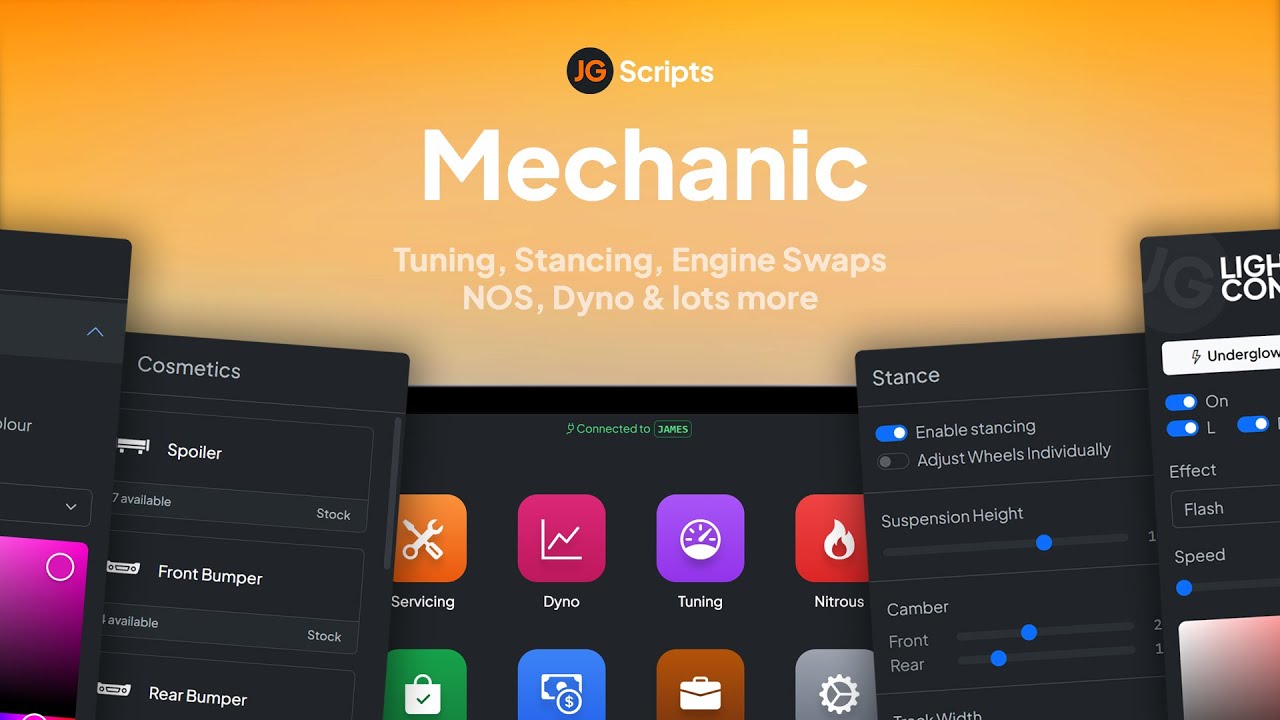
JG Mechanic gives FiveM servers a full RGB and chameleon respray system, OneSync-synced visuals, engine swaps, dyno testing, and mileage-based servicing at 0.0-0.1ms resmon on ESX, QBCore, and Qbox.

esx qbcore qbox
$30.00
FiveM Mechanic & Dealership Bundle bundle
Bundle option

FiveM Mechanic & Dealership Bundle

6 scripts Includes this product

$67.99 $95.98 Save $27
Bundle details
Secure checkout by Tebex Digital delivery after checkout Tebex Your Game Studio, Extended.
Overview

Standard GTA color pickers give players about 130 swatches and call it customisation. The JG Mechanic script opens the full RGB spectrum — millions of possible paint combinations — plus chameleon finish options that shift hue with the viewing angle. That RGB respray system is the headline, but it sits inside a complete mechanic job with enough depth to justify a dedicated garage business on your server.

RGB Respray and Paint Features

The respray system covers primary, secondary, and pearlescent channels with a live color search so players aren't scrolling blindly. Chameleon effects apply to body panels, wheels, and compatible interiors. Xenon headlight color and underglow neon are both configurable with effects including rainbow cycle and flash patterns. All visual effects synchronise via OneSync Infinity state bags, so the paint job a player sees on their screen is what everyone else in the vicinity sees too — no ghost-color desync that plagues older respray scripts.

  • Full RGB color picker with search — millions of combinations
  • Chameleon finish on body, wheels, and interiors where supported
  • Xenon and underglow neon with rainbow and flash modes
  • OneSync state bag sync — effects visible to all nearby players
  • Vehicle stance: per-wheel camber, suspension, and tracking
  • Engine swaps, manual transmissions, and performance tier tuning
  • Dyno testing with live HP/torque graph output on the mechanic tablet
  • Mileage-based servicing — vehicles degrade and require real maintenance
  • Automated invoice system with per-category pricing and editable rates
  • Up to 7 Discord webhook channels for business logging
  • 0.0-0.1ms resmon during normal operation

Framework and Server Requirements

The script runs on ESX, QBCore, and Qbox and requires OneSync Infinity, server build v7290 or later, oxmysql, and ox_lib. The tablet-based interface handles dyno testing, invoice dispatch, and business management without additional UI dependencies. Interactive car lifts ship as custom props job-locked to the mechanic shop zone.

Is JG Mechanic Worth It?

This is a full mechanic economy in one resource — not just a respray menu bolted onto a repair script. The mileage system creates recurring server income for mechanic players because vehicles that drive regularly will eventually need professional attention. Combined with the dyno and invoice systems, a server owner can run an entire automotive business without stitching together four separate scripts. The 0.0-0.1ms idle resmon holds even on populated servers, which is the number that matters most when evaluating any always-on job script.

Installation plan

Set up JG Mechanic Script safely

Use the documentation included with the download as the final authority. This plan helps you prepare a rollback, install in the right order, and verify the resource before it reaches players.

Resource type
FiveM script
Compatibility shown
ESX QBCore Qbox
Catalog category
ESX Scripts
Package source
JG Scripts
  1. Audit the package and requirements

    Open the supplied documentation before moving files or changing the database. Build the install order from the package, not from assumptions.

    • Identify the actual resource folder, required dependencies, and supported framework version.
    • Locate any SQL, configuration examples, permissions, or optional integrations.
    • Check whether the documentation requires a specific start order.

    Ready when Every dependency and required file has a place in your install plan.

  2. Create a rollback point

    Prepare the server so the change can be reversed cleanly if the resource conflicts with your current stack.

    • Keep an untouched copy of the downloaded package.
    • Back up the database and every configuration file you will edit.
    • Use a test server or schedule a maintenance window before changing production.

    Ready when You can restore the previous database, files, and configuration.

  3. Install in the documented order

    Apply only the changes supplied for this resource, keeping dependency and startup order intact.

    • Place the resource folder where your server loads resources, without renaming it unless instructed.
    • Install dependencies first, then import included SQL once and review configuration values.
    • Add the documented resource name to the server startup configuration after its dependencies.

    Ready when The resource starts without missing files, exports, tables, or dependencies.

  4. Verify the complete player flow

    Restart the test server, watch both server and client consoles, and exercise the resource before opening it to players.

    • Test the main workflow with an authorized player and a player without permission.
    • Reconnect and restart once to confirm saved state and startup behavior.
    • Review console output again before promoting the same configuration to production.

    Complete when The intended flow works twice with no new console errors.

Support reference Use the exact listing name when you contact support.
JG Mechanic Script Contact support

JG Mechanic Script compatibility and specs

Frameworks
ESX · QBCore · Qbox
Category
Creator
Delivery
After checkout — order download link
Product terms
See product details — terms vary by resource
[ You might also like ]

Related scripts

About this FiveM script

JG Mechanic Script is a FiveM resource for esx, qbcore, qbox servers. Review the product details, requirements, and compatibility notes before ordering.

Use the included files and documentation as the source of truth for installation, configuration, dependencies, and any stated performance information.