
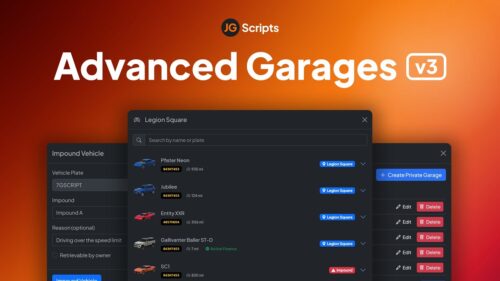
JG Advanced Garages v3
Already the most popular† premium garage script available for FiveM, Advanced Garages v3 takes the garage experience to a whole new level. Public, private, house, job and gang garages in addition to a fully featured impound system. Compatible with QBCore, Qbox, ESX Legacy and boasting dozens of out the box integrations with scripts from your favourite creators, you’ll quickly realise why we are the garage script of choice for the best FiveM servers.
Features of JG Advanced Garages V3:
😊 Super Easy Setup
It just works. With our unique JG Configurator, you can configure the tool using an intuitive UI and never have to touch any code. Plus, dozens of out of the box integrations with scripts from your favourite creators mean you can spend more time creating an amazing experience for your players, and less time in a code editor.
🏡 Private Garages
Use of our many housing script integrations to bring garages to player houses or other private locations. Need a one-off garage for a player or a small group of players? Simply use our in-game private garages manager – which makes it easy to create, edit or delete private garages on the fly and will instantly sync for players to use right away.
🧰 Job & Gang Garages
Set up job locked garages that can store personal vehicles, database stored shared job vehicles, or simple spawners to create new vehicles on demand. Highly configurable, with additional optional menu to set liveries, extras, and performance modifications. Please note: Gang garages are only supported out of the box with QBCore & Qbox.
🚧 Vehicle Impound
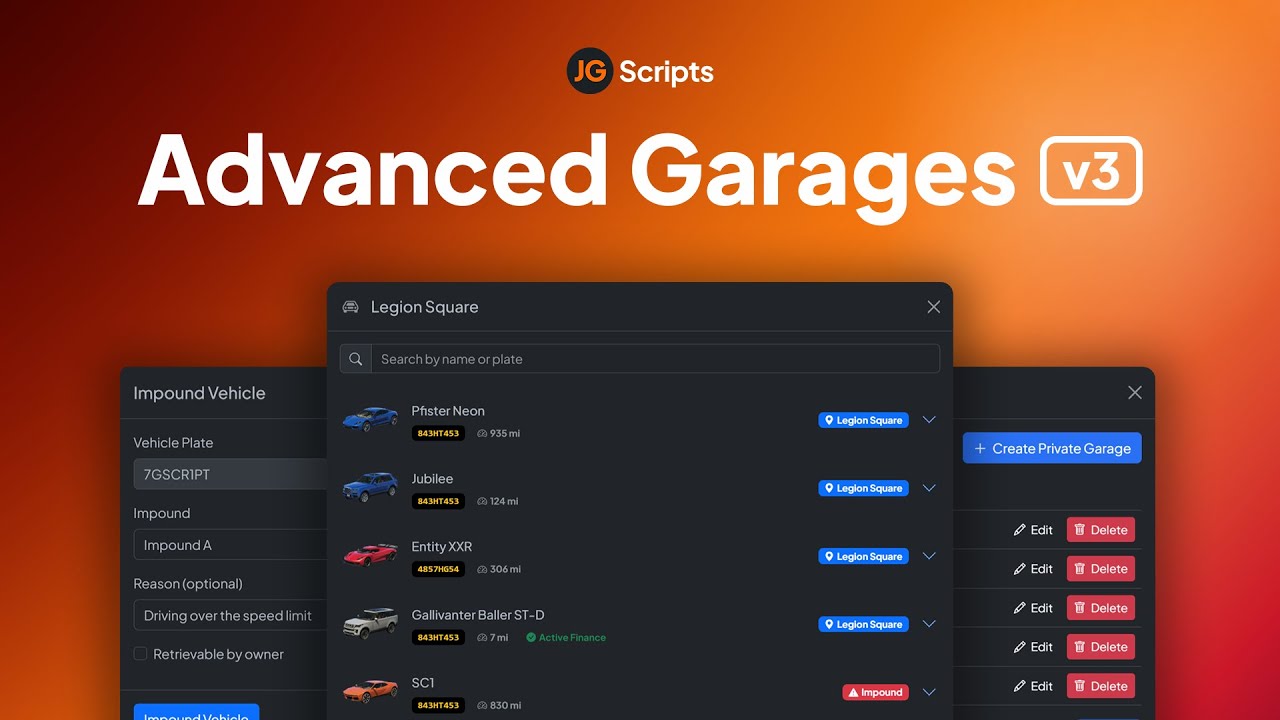
Individually configurable impound locations, restricted by job. Whitelisted members can impound vehicles and set a reason, retrieval cost or restrict self-retrieval and even set a time that the vehicle owner must wait.
✨ Garage Interiors
View your entire car collection in-person with our (optional) interors feature. Players can walk into their garage, look around their cars and simply jump in and drive it away. When entering a vehicle, a useful stats HUD appears with vehicle details such as fuel and damage.
✈️ Car, boat and air garages
Not just for cars! Create separate boat and air garages for all garage types, including impounds for a realistic and immersive experience.
🚗 Infinite Garage Locations
Create as many garage locations as you’d like and choose whether players can take a vehicle from any garage, must visit the vehicle’s last location, or let them transfer between garages.
⚡ Performance & Security
Designed with performance in mind, Advanced Garages v3 is the best choice for high population servers looking for a highly optimised, secure and performant garage solution. Features such as vehicle duplication protection, spawn pileup protection and logging make moderation a breeze. Rigorously tested on servers with 300+ active players with minimal resource usage.
💎 Intuitive & Fun to Use
Super easy to use, and awesome to look at. Your players will love the immersive experience with both physical garage interiors as well as via a menu. See vehicle thumbnail previews, impound status, rename your vehicles, search, transfer vehicles to your friends and so much more.
💻 Admin commands
Lots of admin commands available, such as /admincar for adding vehicles to your garage on older versions of ESX, /vreturn, /vplate and /dvdb.
The Highlights (TL;DR)
- 😊 Easy Setup: Online configuration tool for hassle-free setup, loads of third-party script integrations.
- 💻 Admin Tools: Comprehensive commands for vehicle management.
- 🏡 Private Garages: Integrates with housing scripts for easy management of private garages.
- 🧰 Job/Gang Garages: Job and gang-specific garages with customization options; compatible with QBCore.
- 🚧 Configurable Impound: Set impound conditions, costs, and wait times, restricted by job.
- ✨ Interactive Interiors: Optional detailed interiors for vehicle viewing and interaction.
- ✈️ Public Garages: Supports cars, boats, and aircraft with dedicated impound areas.
- 🚗 Unlimited Locations: Create and manage numerous garage locations with flexible vehicle access.
- ⚡ High Performance: Optimized for large servers (300+ plyr), includes security features like duplication and spawn pileup protection.
- 💎 User-Friendly: Intuitive interface with physical and menu-based interactions, vehicle previews, and easy transfers.
Showcase :
![[200] Tattoo Pack for FiveM Servers | Supports qb and esx](https://scripts-tebex.io/wp-content/uploads/e73d9e860085a63ed71ca78e292331740ea973c4-scaled-1.png)





![Full Drugs Package [Processing + Sales]](https://scripts-tebex.io/wp-content/uploads/858ac079f079303eb2f86277eaf784af2b2eb76f.jpg)

![Latest QBCore Framework V7 [NoPixel 4.0 Inspired]](https://scripts-tebex.io/wp-content/uploads/QBCore-Framework-V7.png)


Lizzie Delaney (verified owner) –
JG Advanced Garages v3 is hands down one of the best garage scripts I’ve used for my server. The setup process was incredibly smooth thanks to the JG Configurator, and the performance is rock solid even with our high player count. I love the vehicle previews and the intuitive UI, though I wish gang garage support was a bit more flexible for non-QBCore frameworks. Overall, it’s a premium product that definitely elevates the player experience.
Lizzie Delaney (verified owner) –
JG Advanced Garages v3 is hands down one of the best garage scripts I’ve used for my server. The setup process was incredibly smooth thanks to the JG Configurator, and the performance is rock solid even with our high player count. I love the vehicle previews and the intuitive UI, though I wish gang garage support was a bit more flexible for non-QBCore frameworks. Overall, it’s a premium product that definitely elevates the player experience.