
QBCore Framework V4
QB Core V4 FiveM server on build 1.2.6 — crypto mining, gun dealer, black market, Cayo Island, PMA-voice, Discord webhooks, and a full civilian and criminal economy out of the box.
Shelved in QBCore Scripts119 products on this shelf Qbox Scripts120 products on this shelf
$100.00
Secure checkout by Tebex
Digital delivery after checkout
Tebex
Your Game Studio, Extended.
Overview
Reviews
QB Core Framework V4 is built on qb-core release 1.2.6 — a specific, dated build rather than a rolling latest-commit checkout. That matters for server owners who've been burned by upstream changes breaking scripts mid-season. V4 locks in a known-good state with security patches applied, giving you a stable base to customise around without worrying about framework churn underneath.
Economy and Criminal Systems
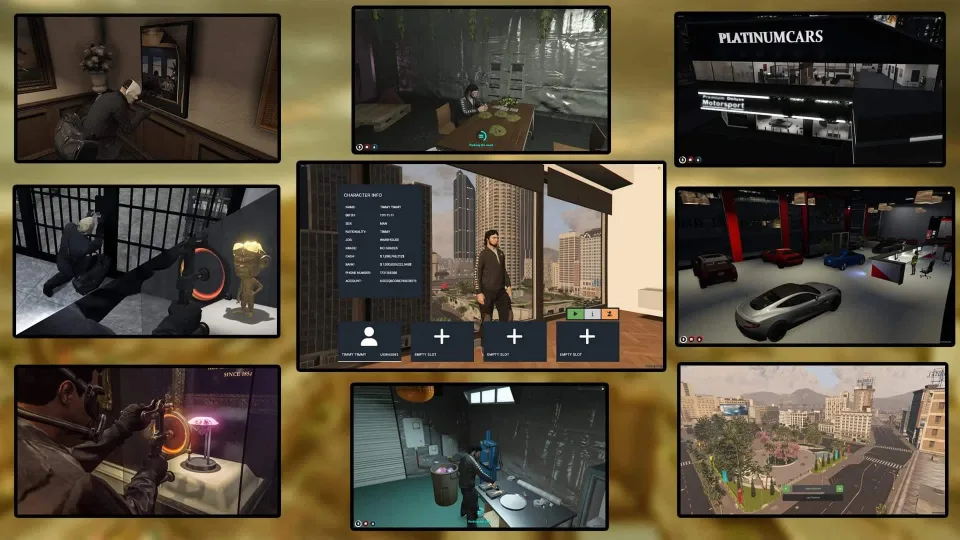
V4's standout area is its economy depth. Alongside the standard job income loop, it layers in crypto and bitcoin mining — passive income streams that give players a reason to stay logged in during low-activity hours. The criminal side is equally developed: a black market for off-books item trading, a gun dealer system separate from the legal weapon shop, and drug processing mechanics with multiple production stages.
- Bitcoin and crypto mining with wallet and exchange mechanics
- Black market system with restricted item access for criminal characters
- Illegal gun dealer separate from licensed weapon stores
- Advanced drug processing with multi-step production flows
- Bank and shop robbery systems with configurable police notification logic
- Gang management: member hierarchy, boss menu, and territory access controls
- Cayo Island content integration with accessible map locations
Civilian Infrastructure
- Custom apartment interiors with per-player ownership and spawn selection
- PMA-voice proximity audio replacing stock mumble-voip
- Police and EMS outfits, vehicles, and AI traffic for immersive patrols
- LSPD and EMS application forms posting directly to Discord via webhooks
- MDT for law enforcement with active dispatch and warrant features
- Vehicle luxury shop and PDM car dealership with purchase logging
- Eye-target interaction system across the full script set
- Custom emotes library for character expression
- Walmart, mall, and prison map locations with matching job hooks
- Extensive addon vehicle pack pre-loaded in the resource list
Stability and Security
The 1.2.6 build tag means this is a version-pinned package — the same security patches and bug fixes applied to the official QBCore release at that point in the changelog. Discord webhook integration for staff applications and player logs is wired in at the framework level, not bolted on as an afterthought, which means it actually fires reliably during the events that matter.
Ideal Use Case
V4 is the pick for server owners who want a documented build version they can reference when troubleshooting script compatibility or onboarding a developer to the codebase. It's also the strongest option for communities that want passive economy features — crypto mining keeps players engaged outside peak hours in a way that pure job-loop servers can't match.
Installation
- Unpack the build and copy its resources into the server's
resourcesdirectory. - Give each an
ensureline inserver.cfg, with qb-core starting first. - Boot the server once and let the whole list load before changing anything.
- Add your own Discord webhook URLs for the LSPD and EMS application forms and the player logs.
- Then set the economy side — mining, black market, gun dealer, drug processing — and the police notification thresholds on the robbery systems.
Requirements
Built on the qb-core 1.2.6 release, so it expects a QBCore base at that build; Qbox is supported as well. Beyond qb-core itself, nothing further is listed as required.
Installation plan
Set up QBCore Framework V4 safely
Use the documentation included with the download as the final authority. This plan helps you prepare a rollback, install in the right order, and verify the resource before it reaches players.
- Resource type
- FiveM script
- Catalog category
- QBCore Scripts
- Package source
- Shop Tebex
-
Audit the package and requirements
Open the supplied documentation before moving files or changing the database. Build the install order from the package, not from assumptions.
- Identify the actual resource folder, required dependencies, and supported framework version.
- Locate any SQL, configuration examples, permissions, or optional integrations.
- Check whether the documentation requires a specific start order.
Ready when Every dependency and required file has a place in your install plan.
-
Create a rollback point
Prepare the server so the change can be reversed cleanly if the resource conflicts with your current stack.
- Keep an untouched copy of the downloaded package.
- Back up the database and every configuration file you will edit.
- Use a test server or schedule a maintenance window before changing production.
Ready when You can restore the previous database, files, and configuration.
-
Install in the documented order
Apply only the changes supplied for this resource, keeping dependency and startup order intact.
- Place the resource folder where your server loads resources, without renaming it unless instructed.
- Install dependencies first, then import included SQL once and review configuration values.
- Add the documented resource name to the server startup configuration after its dependencies.
Ready when The resource starts without missing files, exports, tables, or dependencies.
-
Verify the complete player flow
Restart the test server, watch both server and client consoles, and exercise the resource before opening it to players.
- Test the main workflow with an authorized player and a player without permission.
- Reconnect and restart once to confirm saved state and startup behavior.
- Review console output again before promoting the same configuration to production.
Complete when The intended flow works twice with no new console errors.
Support reference
Use the exact listing name when you contact support.
QBCore Framework V4
Contact support
QBCore Framework V4 compatibility and specs
Category
Delivery
After checkout — order download link
Product terms
See product details — terms vary by resource
No reviews yet — be the first to write one.
Write a review
Reviews are moderated before appearing. Purchased the product? Your review gets a VERIFIED badge automatically.
[ You might also like ]
Related scripts



- ESX
- QBCore
- Qbox
Optimized Anticheat FiveM
Server-side FiveM anticheat with 841 blocked models, multi-identifier banning, event protection, and entity spam limits. No client component. Framework-free. Refined over 5 years.
$9.00
- ESX
- QBCore
- Qbox
Advanced Crafting
Samuel’s Advanced Crafting delivers branching tech trees, placeable persisted workbenches, blueprint durability, shared crew queues, and 11+ inventory integrations for ESX, QBCore, and QBox at under 0.01ms resmon.
FREE
- ESX
- QBCore
- Qbox
Bodybag Script
Close crime scenes properly with bodybag placement, configurable job or item gates, statebag sync that survives restarts, and 0.00ms overhead. ESX, QBCore, and Qbox supported.
$10.00

- ESX
- QBCore
- Qbox
Advanced Ankle Monitor Script
Let officers place real tracking devices on offenders — with a proper leg prop, configurable update intervals, lockpick removal, and 0.00ms idle. ESX, QBCore, and Qbox ready.
$10.00
- ESX
- QBCore
- Qbox
FREE Keypad Minigame
Free, unencrypted FiveM keypad minigame with configurable PIN length, attempt limits, and per-attempt feedback. Works standalone or with ESX, QBCore, and Qbox. Zero cost, full source.
FREE
 Popular
- ESX
- QBCore
- Qbox
Police Vehicle Trunk
Give FiveM officers a proper equipment trunk — visual prop layout, per-vehicle item config, clothing slots, job-gated access, and 0.03ms active usage. ESX, QBCore & Qbox.
$10.00

- ESX
- QBCore
- Qbox
Drug Manufacturing Jobs (Gang Integration)
Complete FiveM drug operation script for ESX, QBCore, and Qbox — upgradeable labs, burner phone dark web sourcing, multi-drug production, built-in money laundering, and 0.00ms server load.
$20.00
About this FiveM script
QBCore Framework V4 is a FiveM resource for qbcore, qbox servers. Review the product details, requirements, and compatibility notes before ordering.
Use the included files and documentation as the source of truth for installation, configuration, dependencies, and any stated performance information.