
 Sale
Sale
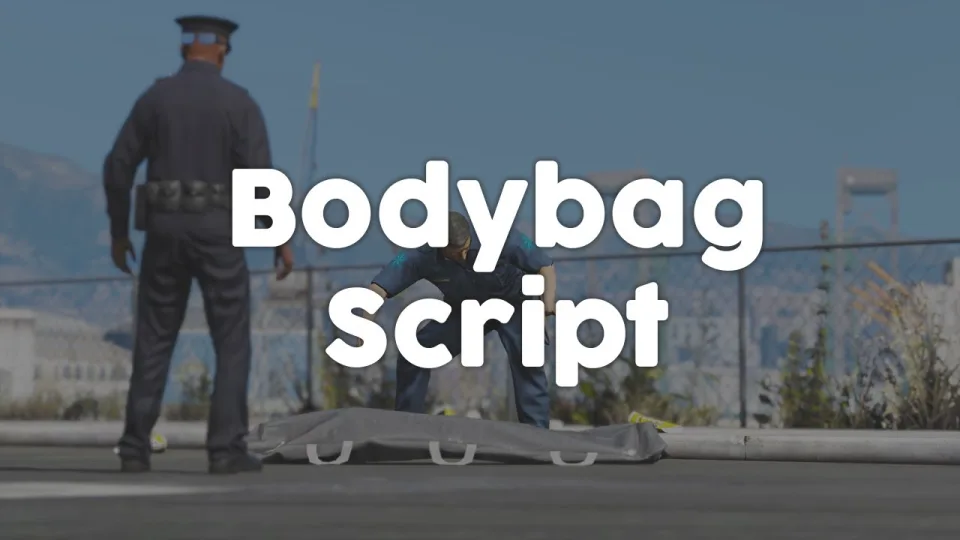
Bodybag Script
Close crime scenes properly with bodybag placement, configurable job or item gates, statebag sync that survives restarts, and 0.00ms overhead. ESX, QBCore, and Qbox supported.
Shelved in ESX Scripts110 products on this shelf QBCore Scripts119 products on this shelf Qbox Scripts120 products on this shelf
$10.00
Secure checkout by Tebex
Digital delivery after checkout
Tebex
Your Game Studio, Extended.
Overview
Reviews
Most death interactions in FiveM stop at the downed state — a body lying in the road with nothing to close the scene. This bodybag script gives EMS and law enforcement the ability to physically wrap and transport deceased players, turning a flat mechanic into something that actually completes a crime scene narrative.
The design philosophy here is minimal dependency. The only hard requirement is a targeting system (ox_target or qb-target); beyond that you configure whether job restrictions or item requirements are needed, or skip both entirely for open-access servers. That flexibility means it fits into a barebones QBCore setup and an ESX server running a full medical framework without rewiring either.
Key Features
- Bodybag placement and removal on dead players via target interaction
- Removable bodybags with toggleable disable — lock removal to specific roles if needed
- Job and item requirements independently configurable (use one, both, or neither)
- Statebag-based synchronisation keeps all clients consistent with zero desyncs on restart
- Safe to restart the resource mid-scene — placed bags persist correctly through the cycle
- Exports and server events exposed for other scripts to add or remove bags programmatically
- Bridge functions available for framework-level customisation without patching core files
- 0.00ms resource monitor reading — confirmed at idle and during active use
Framework Compatibility
Framework-agnostic with built-in support for ESX, QBCore, and Qbox. Requires a target system; ox_target and qb-target both work.
The restart-safe statebag implementation is the detail most competing scripts get wrong — a half-wrapped body that vanishes on resource restart breaks immersion and creates unnecessary support tickets. This script handles that correctly out of the box. Rated 4.5/5 across ten community reviews.
Installation
- Make sure ox_target or qb-target is running; one of the two is the single hard requirement.
- Drop the resource into
resourcesand add itsensureline toserver.cfg. - Decide in the config whether job restrictions, item requirements, both or neither apply, and whether placed bags can be removed again.
- Restart the server, bag a downed test player, then restart the resource mid-scene to confirm the bag survives the cycle.
- Point any other resource that needs to place or clear bags at the exports and server events provided, rather than patching core files.
Installation plan
Set up Bodybag Script safely
Use the documentation included with the download as the final authority. This plan helps you prepare a rollback, install in the right order, and verify the resource before it reaches players.
- Resource type
- FiveM script
- Catalog category
- ESX Scripts
- Package source
- Shop Tebex
-
Audit the package and requirements
Open the supplied documentation before moving files or changing the database. Build the install order from the package, not from assumptions.
- Identify the actual resource folder, required dependencies, and supported framework version.
- Locate any SQL, configuration examples, permissions, or optional integrations.
- Check whether the documentation requires a specific start order.
Ready when Every dependency and required file has a place in your install plan.
-
Create a rollback point
Prepare the server so the change can be reversed cleanly if the resource conflicts with your current stack.
- Keep an untouched copy of the downloaded package.
- Back up the database and every configuration file you will edit.
- Use a test server or schedule a maintenance window before changing production.
Ready when You can restore the previous database, files, and configuration.
-
Install in the documented order
Apply only the changes supplied for this resource, keeping dependency and startup order intact.
- Place the resource folder where your server loads resources, without renaming it unless instructed.
- Install dependencies first, then import included SQL once and review configuration values.
- Add the documented resource name to the server startup configuration after its dependencies.
Ready when The resource starts without missing files, exports, tables, or dependencies.
-
Verify the complete player flow
Restart the test server, watch both server and client consoles, and exercise the resource before opening it to players.
- Test the main workflow with an authorized player and a player without permission.
- Reconnect and restart once to confirm saved state and startup behavior.
- Review console output again before promoting the same configuration to production.
Complete when The intended flow works twice with no new console errors.
Support reference
Use the exact listing name when you contact support.
Bodybag Script
Contact support
Bodybag Script compatibility and specs
Category
Delivery
After checkout — order download link
Product terms
See product details — terms vary by resource
No reviews yet — be the first to write one.
Write a review
Reviews are moderated before appearing. Purchased the product? Your review gets a VERIFIED badge automatically.
[ You might also like ]
Related scripts
Sale
- ESX
- QBCore
- Qbox
FREE MDT for Police
A fully free police MDT for FiveM with warrants, criminal records, vehicle database, auto nearest-player lookup, and five-language support. ESX, QBCore & Qbox. Rated 4.89/5.
FREE
- ESX
- QBCore
- Qbox
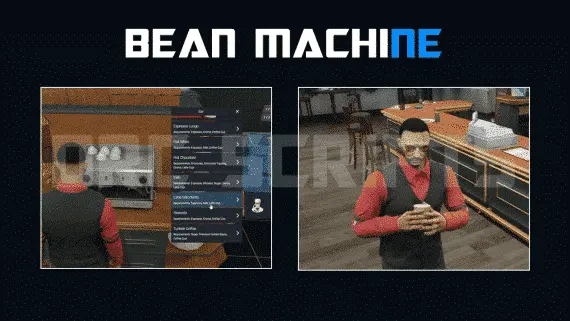
DRC Beanmachine Job
DRC Bean Machine brings a NoPixel-inspired coffee shop job to ESX, QBCore, and Qbox with 57 interactive items, multi-step cooking, 40 delivery routes, and a full boss management suite.
$10.00


- ESX
- QBCore
- Qbox
Advanced Multijob & Boss Menu
Samuel’s Advanced Multijob & Boss Menu supports unlimited concurrent jobs, polyzone duty enforcement, per-job leaderboards, 12 inventory integrations, and a full boss management suite for QBCore and QBox servers.
$20.00
- ESX
- QBCore
- Qbox
Closed Shops NPC
Closed Shops NPC keeps food job locations open when workers log off. Workers restock inventory to earn passive income; the NPC despawns the moment real staff return. QBCore, ESX, Qbox. Live pricing with admin price caps.
$3.00
- ESX
- QBCore
- Qbox
FiveM Pepperspray Script
Adds a job-restricted pepper spray addon weapon to FiveM with configurable cone, range, paralysis duration, and gas mask immunity. ESX, QBCore, Qbox. Under 0.03ms at peak.
$15.00
 New
New
- ESX
- QBCore
- Qbox
Weapon Attachment UI
Visual FiveM weapon attachment UI with inventory persistence, addon weapon support, job/item gates, and 0.01ms active cost. Standalone or integrated with ox, ESX & QBCore inventory.
$4.99
About this FiveM script
Bodybag Script is a FiveM resource for esx, qbcore, qbox servers. Review the product details, requirements, and compatibility notes before ordering.
Use the included files and documentation as the source of truth for installation, configuration, dependencies, and any stated performance information.