
Lets Cook Plus
Shelved in ESX Scripts110 products on this shelf QBCore Scripts119 products on this shelf Qbox Scripts120 products on this shelf
$15.00
Secure checkout by Tebex
Digital delivery after checkout
Tebex
Your Game Studio, Extended.
Overview
Reviews
Lets Cook Plus
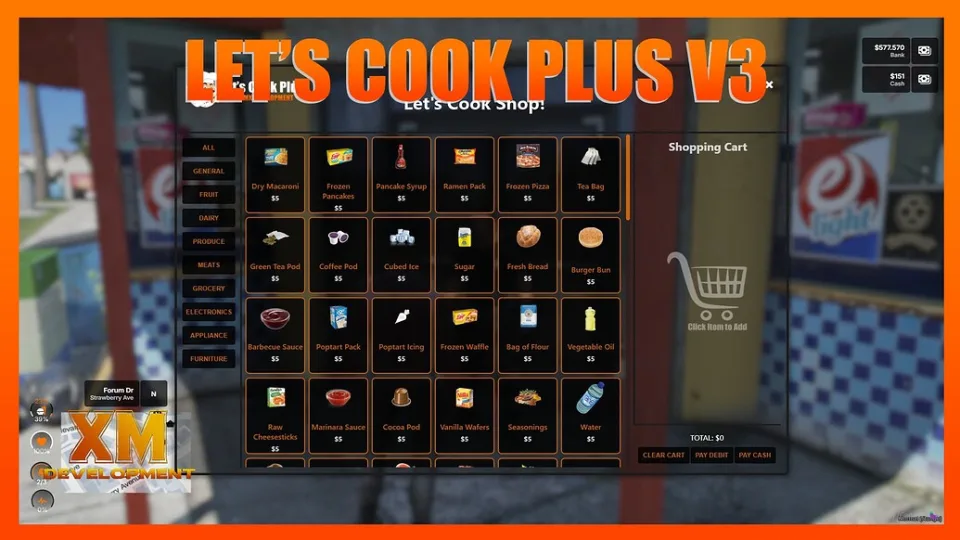
Lets Cook Plus is a crafting script built with custom menu and shop UIs. It supports props as items and adds usable printers and music speakers to your server.
Dependencies
- The xmmx_bridge resource allows for integration into any framework, inventory, and target system
- xmmx_keysgame (optional, but included)
- xmmx_bridge (included)
- ox_lib
Examples
Third-eye any microwave to heat up food fast. Most appliances work including coffee makers, food processors, juicers, stoves, pots, pans, and griddles, with options to add more target appliances in the config.lua file.
Third-eye the barbecue grill for ingredients like barbecue ribs, BBQ chicken, steaks, and grilled corn on the cob. Use a toaster oven to make a grilled cheese toastie at home.
Script Features of Lets Cook Plus
- Script is open and customizable
- Supports 3 different Target Systems including qb-target, ox_target, and qtarget
- Add custom items like foods, drinks, weapons, and ammo with basic lua knowledge
- Police Alerts for Moonshining and Weapons Manufacturing
- Minigame Failure Option for Weapons, Attachments, and Ammo Crafting to lose the craft bench
- Minigame Failure Option for Moonshine Crafting to cause a still explosion
- Consumable Rewards when eating or drinking crafted items used in weapons, attachment, and ammo crafting
- Minigame Option for all crafting events listed above
- Weapons, attachments, and ammo crafting
- Moonshine crafting
- Items and drug crafting
- Food and drinks crafting
Players can prepare meals at home or anywhere with an appliance by purchasing ingredients from a store configured in qb-shops.
Installation
- Make sure
ox_libis running, along withxmmx_bridge, which ships with the download. - Drop the resource into
resourcesand add itsensureline toserver.cfg. - Add the foods, drinks, weapons and ammo you want craftable to
config.lua; the same file lists which appliances can be third-eyed. - Stock the ingredients in a shop so players have somewhere to buy them.
- Restart and test on a microwave or the barbecue grill.
Requirements
ox_lib is required. Interaction runs through a target system — ox_target or qb-target — and the included bridge covers the framework, inventory and target combination your server already runs.
Installation plan
Set up Lets Cook Plus safely
Use the documentation included with the download as the final authority. This plan helps you prepare a rollback, install in the right order, and verify the resource before it reaches players.
- Resource type
- FiveM script
- Catalog category
- ESX Scripts
- Package source
- XMMX Development
-
Audit the package and requirements
Open the supplied documentation before moving files or changing the database. Build the install order from the package, not from assumptions.
- Identify the actual resource folder, required dependencies, and supported framework version.
- Locate any SQL, configuration examples, permissions, or optional integrations.
- Check whether the documentation requires a specific start order.
Ready when Every dependency and required file has a place in your install plan.
-
Create a rollback point
Prepare the server so the change can be reversed cleanly if the resource conflicts with your current stack.
- Keep an untouched copy of the downloaded package.
- Back up the database and every configuration file you will edit.
- Use a test server or schedule a maintenance window before changing production.
Ready when You can restore the previous database, files, and configuration.
-
Install in the documented order
Apply only the changes supplied for this resource, keeping dependency and startup order intact.
- Place the resource folder where your server loads resources, without renaming it unless instructed.
- Install dependencies first, then import included SQL once and review configuration values.
- Add the documented resource name to the server startup configuration after its dependencies.
Ready when The resource starts without missing files, exports, tables, or dependencies.
-
Verify the complete player flow
Restart the test server, watch both server and client consoles, and exercise the resource before opening it to players.
- Test the main workflow with an authorized player and a player without permission.
- Reconnect and restart once to confirm saved state and startup behavior.
- Review console output again before promoting the same configuration to production.
Complete when The intended flow works twice with no new console errors.
Support reference
Use the exact listing name when you contact support.
Lets Cook Plus
Contact support
Lets Cook Plus compatibility and specs
Category
Creator
Delivery
After checkout — order download link
Product terms
See product details — terms vary by resource
No reviews yet — be the first to write one.
Write a review
Reviews are moderated before appearing. Purchased the product? Your review gets a VERIFIED badge automatically.
[ You might also like ]
Related scripts

- ESX
- QBCore
- Qbox
FREE Drone Script for FiveM
Free, open-source FiveM drone script with full controller support, Fivemanage aerial screenshots, night vision, configurable HUD, and signal-loss mechanics. ESX, QBCore & Qbox ready.
FREE

- ESX
- QBCore
- Qbox
Smash N Grab 2.0
FiveM car looting script letting players raid NPC vehicles with seat-based loot placement, configurable odds by vehicle class, minigame break-ins, NPC reactions, and police dispatch — no entity limit impact.
$9.99
- ESX
- QBCore
- Qbox
BLVCK HUD V2
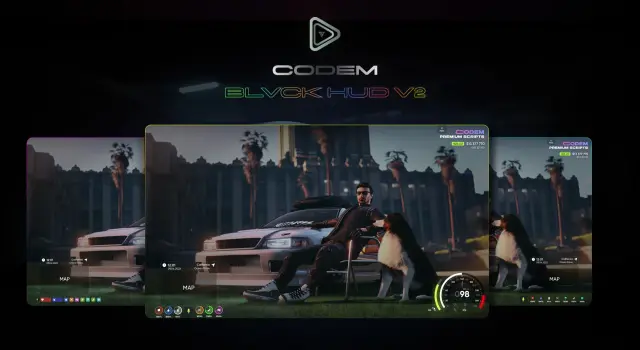
BLVCK HUD V2 delivers three switchable HUD styles, server-synced nitro visible to all nearby players, cinematic mode, and an optional stress system for ESX, QBCore, and Qbox servers.
$5.00

- ESX
- QBCore
- Qbox
Holographic & Audible Notifications
ElevenLabs-powered TTS notification script for FiveM — fire voiced, holographic alerts from any resource via a single export. Smart caching, 30+ languages. ESX, QBCore, Qbox compatible.
$5.99
- ESX
- QBCore
- Qbox
Custom Shops Pro
Custom Shops Pro is a full player-owned shop system for FiveM with loyalty tiers, coupon campaigns, pawn and dirty money support, 55+ staff permissions, and deep analytics across ESX, QBCore, and QBox.
FREE
- QBCore
- Qbox
QBCore Framework V4
QB Core V4 FiveM server on build 1.2.6 — crypto mining, gun dealer, black market, Cayo Island, PMA-voice, Discord webhooks, and a full civilian and criminal economy out of the box.
$100.00

- ESX
- QBCore
- Qbox
Mining Job V3
Free open source FiveM mining job for ESX, QBCore and Qbox — four-stage chain from raw rock to smelted ore to crafted jewelry, with tool durability, quests, coal delivery missions, and a live XP leaderboard.
FREE
 New
New
About this FiveM script
Lets Cook Plus is a FiveM resource for esx, qbcore, qbox servers. Review the product details, requirements, and compatibility notes before ordering.
Use the included files and documentation as the source of truth for installation, configuration, dependencies, and any stated performance information.