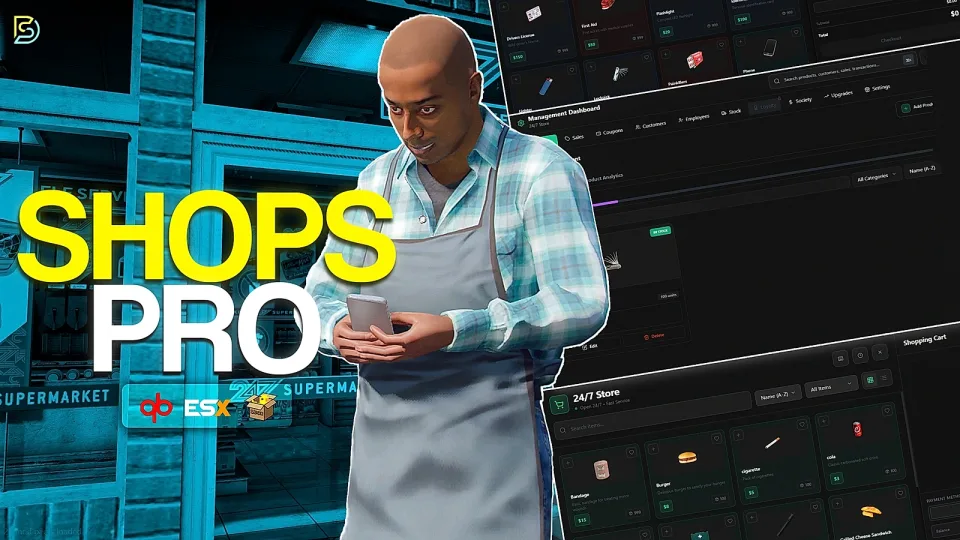
Custom Shops Pro
The ultimate shop system your server deserves.
The most comprehensive and feature-rich shop script for FiveM.
Genuinely the most complete shop system you'll find for FiveM. Over a hundred hours invested perfecting every detail, from the intuitive customer experience to the powerful management dashboard with 55+ granular permissions, comprehensive analytics, advanced stock management, and much more. This isn't just a shop script, it's a complete business simulation that transforms how shops work on your server.
Showcase :
Advanced Shop System
Main Features
Automatic Everything
The included bridge automatically detects:
Item information is automatically pulled:
All values can be overridden per item if needed.
Extensive Logging
Built-in logging support for:
- Discord (formatted embeds)
Features:
- Configurable destinations
Metadata Support
Configure any item with custom metadata:
Sell multiple variants of the same item, such as:
Works with both owned and non-owned shops.
Full Theme Customization
Includes 10 built-in presets:
Customization options include:
Background options:
All configured through a single theme.lua.
Unlimited Shop Types
Create any kind of storefront:
Each shop maintains its own:
Translations & Localization
Full locales system for easy text customization.
Included:
Add your own language in minutes.
Peak Performance
- 0.01ms in the main shop menu
- Briefly 0.02ms while loading management data
Intelligent caching minimizes database queries while smooth client-side operations reduce callback usage.
Compatibility
Fully compatible with:
Auto-detected.
Supported Inventories
Supported Society Banking Systems
Drop the resource in and it automatically detects your framework, inventory, and targeting system.
Highly Configurable
Detailed configuration surface allowing every aspect of the system to be customized.
Customer Experience
Serial Registration
Weapons can optionally receive serial numbers through metadata.
Per-Shop Feature Toggles
Enable or disable features individually per shop:
Ideal for specialty stores.
Job-Restricted Shops
Restrict shops to specific jobs.
Examples:
Supports multiple allowed jobs per shop.
Pawn Shop System
Sell items directly from inventory.
Features:
- Total payout calculations
Illegal Shops (Black Market)
Configure shops to accept dirty money only.
Features:
- Optional player ownership
Item-for-Item Exchanges
Accept items as currency instead of money.
Examples:
Full Exchange Shops
Mixed Currency Shops
Supports cash and item deductions within the same purchase.
Favorites
Mark products as favorites for quick access.
Dedicated filtering allows players to browse only starred items.
License Restriction System
Restrict products behind licenses.
When requirements are not met:
- Clear "License Required" notification is shown
Transaction History & Reorder
View complete purchase history including:
One-click reorder instantly recreates previous purchases.
Cart Presets
Save frequently purchased item combinations.
Players can:
- Import presets from others
Loyalty Program
Players earn loyalty points with every purchase.
Features:
Examples:
Coupon System
Redeem promo codes during checkout.
Supports:
Flexible Payment Systems
Supported payment methods:
Society purchases support configurable minimum grades and permission requirements.
Smart Cart Management
Features:
Item Preview Modal
Click any product to view:
Add products to the cart without leaving the preview.
Intuitive Shopping Interface
Modern responsive UI featuring:
Shop Management & Ownership
Shop Settings
Configure:
Shop names can optionally be locked through configuration.
Comprehensive Analytics
Detailed reporting across the entire business.
Track:
Product Analytics
Promotion Analytics
Customer Insights
Employee Tracking
Stock History
Filter by:
Customer and employee names link directly to detailed profile pages.
Shop Upgrades System
Upgradeable business progression.
Available upgrades:
Stock Capacity
Increase inventory limits.
Reputation
Unlock supplier discounts.
Express Logistics
Reduce delivery times.
Product Slots
Sell more products.
Employee Slots
Hire more staff.
Loyalty Program
Unlock customer rewards.
All upgrades support multiple configurable levels.
Society Account & Finances
Financial management tools include:
Account Management
Business Metrics
Visual Reports
Advanced Filtering
Loyalty Program (Management Side)
Per-shop configuration options:
Example tiers:
Create unlimited rewards with:
Advanced Stock Management
Features:
Supported payments:
Employee Management & Permissions
Granular access control with:
Permission categories include:
Unavailable features remain hidden automatically.
Customer Management
Track customer activity with:
- Individual purchase histories
Ban customers when necessary.
Banned customers receive a clear access-denied message.
Coupon Management
Create fully customizable promo codes.
Features:
- Job and gang restrictions
Sales Management
Create time-limited sales.
Options:
- Scheduled start/end times
Can also be restricted by:
Active sales display original prices with strike-through pricing.
Product Setup
Configure products using a whitelist system.
Options include:
Ownership System
Players can:
Features:
- Configurable purchase prices
- Automatic permission transfer
- Optional ownership system
Ownership can be disabled entirely.
There's much more to explore, with additional features planned for future updates.
Dependencies
Required Framework
Choose one:
Targeting
Choose one:
Libraries
Supported Inventories
Auto-detected.
Choose whatever you already run: