
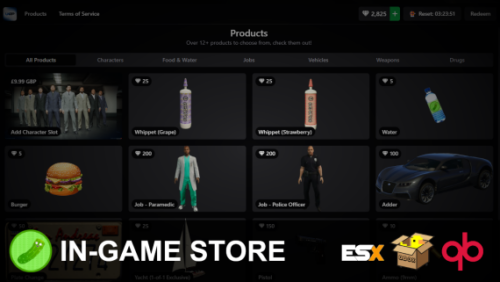
FREE Ingame Tebex Store | Donation Store
Features
- Free Daily Spins for players to get and spin as a reward for playing the server.
- Redemption system (both automatic and manual via transaction ID)
- In-game coin products support global and user limits (0 = no limit).
- Schedule in-game ads via the config, encourage your players to visit the store!
- Tebex packages are retrieved automatically, meaning you can simply add a package on Tebex without doing any configuration – and it’ll show up!
- Create in-game coin products inside of the game, no lua configing required.
- Automatic checkout system (requires discord role reward, checkout is as fast as 5 seconds)
- In-game coin currency system, and customizable to be any type of currency (pickles, emeralds, etc)
- In-game coin products support “one-of-one” purchases, meaning you can sell a package once and automatically remove it when purchased.
- Schedule free coins per time played, to reward your players for playing the server.
- Add custom coin product commands with support for customer fields via the config.
- 10+ Coin Packages included by default.
- And more!
Is this allowed?
Tebex is still the only way to purchase coins, and the script does not allow for any connection to any other platform besides Tebex themselves.
As long as you can earn coins (diamonds by default) through regular gameplay, which this script does by default by giving daily free spins, this is totally allowed.
Showcase
Requirements
- Ox Lib (Required, Works anywhere).
- ESX (1.1+) / QBox / QB, or code your own bridge to work with your framework. (the bridge is fully accessible!)
Description:
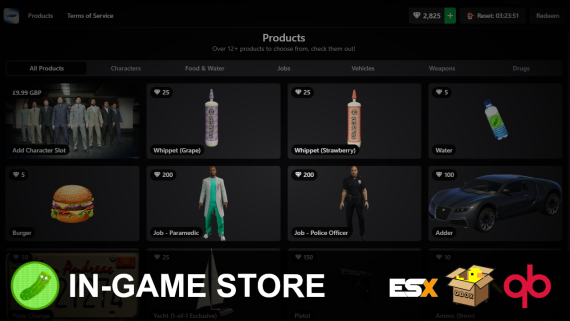
You’ll be able to easily display Tebex packages to your players, run scheduled ads for your store, and create coin products in-game with no restart required.
This is the first ever Tebex-integrated system for FiveM that supports direct purchasing (checkout as fast as 5 seconds), automatic in-game redemption, in-game currencies system and more.



![Full Drugs Package [Processing + Sales]](https://scripts-tebex.io/wp-content/uploads/858ac079f079303eb2f86277eaf784af2b2eb76f.jpg)

![[200] Tattoo Pack for FiveM Servers | Supports qb and esx](https://scripts-tebex.io/wp-content/uploads/e73d9e860085a63ed71ca78e292331740ea973c4-scaled-1.png)

Alessandro Capparelli (verified owner) –
This script is a total game-changer for managing donations without leaving the game. The automatic Tebex sync saves so much time since I don’t have to touch the config for every new package. I love the daily spin feature for keeping players active. It took a bit of tweaking to get the bridge perfect for my server, but overall it’s a fantastic free resource.
Alessandro Capparelli (verified owner) –
This script is a total game-changer for managing donations without leaving the game. The automatic Tebex sync saves so much time since I don’t have to touch the config for every new package. I love the daily spin feature for keeping players active. It took a bit of tweaking to get the bridge perfect for my server, but overall it’s a fantastic free resource.
Quanisha Doldren (verified owner) –
Absolutely amazing resource! The automatic redemption saves me so much time on staff management, and the setup was surprisingly easy. It’s great that you can add packages on Tebex and have them show up instantly in-game. Definitely a 5-star script.
Quanisha Doldren (verified owner) –
Absolutely amazing resource! The automatic redemption saves me so much time on staff management, and the setup was surprisingly easy. It’s great that you can add packages on Tebex and have them show up instantly in-game. Definitely a 5-star script.
Casimir Jones (verified owner) –
The script works as advertised and the Tebex integration is genuinely fast. I love the automatic package retrieval so I don’t have to touch the config constantly. However, I ran into some issues getting the bridge to work with my specific framework version. It’s a decent free tool, but it could use some better documentation.
Casimir Jones (verified owner) –
The script works as advertised and the Tebex integration is genuinely fast. I love the automatic package retrieval so I don’t have to touch the config constantly. However, I ran into some issues getting the bridge to work with my specific framework version. It’s a decent free tool, but it could use some better documentation.
James Clark (verified owner) –
This script is a game-changer for managing donations on my server. The integration with Tebex is seamless, and my players love the daily spins for free coins. Setup was pretty straightforward, though it took a little bit of tweaking to get the framework bridge exactly right. Overall, it’s a fantastic free resource that really professionalizes the store experience.
James Clark (verified owner) –
This script is a game-changer for managing donations on my server. The integration with Tebex is seamless, and my players love the daily spins for free coins. Setup was pretty straightforward, though it took a little bit of tweaking to get the framework bridge exactly right. Overall, it’s a fantastic free resource that really professionalizes the store experience.
Lizzie Delaney (verified owner) –
This script is a game-changer for my server’s monetization. The automatic redemption and fast checkout make the process seamless for players. I love that I can add Tebex packages without having to touch the config. Highly recommended for any serious server owner.
Lizzie Delaney (verified owner) –
This script is a game-changer for my server’s monetization. The automatic redemption and fast checkout make the process seamless for players. I love that I can add Tebex packages without having to touch the config. Highly recommended for any serious server owner.