FREE Admin Menu

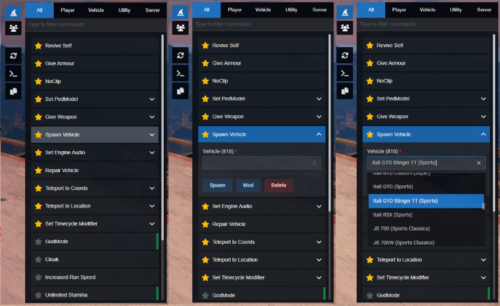
A free React 18 FiveM admin menu with live player headshots, searchable commands, 700+ timecycles, 3000+ vehicles, and ACE permission support. QBCore, ESX & standalone.

qbcore qbox
FREE
Secure checkout by Tebex Digital delivery after checkout Tebex Your Game Studio, Extended.
Overview

Most free admin menus for FiveM are a flat command list wrapped in a basic NUI. This one is built in React 18 with TypeScript and ox_lib on the client — meaning the interface responds, filters, and persists state like a proper web application, not a game overlay bolted together in plain HTML. That distinction shows up immediately in daily use: searching across 700+ timecycle modifiers and 3000+ vehicle spawn codes in real time is the difference between staff actually using the menu and staff memorising commands because the menu is slower.

The live player list with headshot textures and expandable player profiles is the other detail that justifies calling this advanced rather than basic. Staff can see who's online, expand a player's record, and take action — kick, ban, revive, adjust stats — from the same panel without switching contexts. Command favourites with local persistence mean that each staff member's workflow stays personalised across sessions.

Key Features

  • Searchable command interface with category filters — find anything in under two keystrokes
  • Live player list with headshot textures and per-player expandable info panels
  • 700+ timecycle modifiers and 3000+ vehicle spawn codes built in
  • Dynamic form fields: inputs, dropdowns, multi-selects, sliders, and autocomplete
  • NoClip / freecam system with WASD movement and speed adjustment slider
  • Command favourites with local storage persistence across sessions
  • Toggle indicators show active states for godmode, noclip, and cloak at a glance
  • Quick-action sidebar: reload resource, dev mode, copy coordinates, logout
  • Built-in moderation: kick, ban, and revive with targeted player selection
  • QBCore / Qbox integration unlocks job, gang, metadata, and extended commands
  • ACE permission compatible — tie access to existing permission groups

Framework Compatibility

Standalone by default. QBCore and Qbox integration unlocks extended player data commands. ESX supported. Opens via /admin command, U keybind, or the admin:toggleMenu event for custom triggers.

This is free software. The ox_lib and oxmysql dependencies are both open source and already running on most modern FiveM servers. If you're still using a dated admin resource that requires console commands for basic player management, there's no reason not to swap — installation is a resource drop, a server.cfg entry, and a permission group assignment.

Installation plan

Set up FREE Admin Menu safely

Use the documentation included with the download as the final authority. This plan helps you prepare a rollback, install in the right order, and verify the resource before it reaches players.

Resource type
FiveM script
Compatibility shown
QBCore Qbox
Catalog category
QBCore Scripts
Package source
Shop Tebex
  1. Audit the package and requirements

    Open the supplied documentation before moving files or changing the database. Build the install order from the package, not from assumptions.

    • Identify the actual resource folder, required dependencies, and supported framework version.
    • Locate any SQL, configuration examples, permissions, or optional integrations.
    • Check whether the documentation requires a specific start order.

    Ready when Every dependency and required file has a place in your install plan.

  2. Create a rollback point

    Prepare the server so the change can be reversed cleanly if the resource conflicts with your current stack.

    • Keep an untouched copy of the downloaded package.
    • Back up the database and every configuration file you will edit.
    • Use a test server or schedule a maintenance window before changing production.

    Ready when You can restore the previous database, files, and configuration.

  3. Install in the documented order

    Apply only the changes supplied for this resource, keeping dependency and startup order intact.

    • Place the resource folder where your server loads resources, without renaming it unless instructed.
    • Install dependencies first, then import included SQL once and review configuration values.
    • Add the documented resource name to the server startup configuration after its dependencies.

    Ready when The resource starts without missing files, exports, tables, or dependencies.

  4. Verify the complete player flow

    Restart the test server, watch both server and client consoles, and exercise the resource before opening it to players.

    • Test the main workflow with an authorized player and a player without permission.
    • Reconnect and restart once to confirm saved state and startup behavior.
    • Review console output again before promoting the same configuration to production.

    Complete when The intended flow works twice with no new console errors.

Support reference Use the exact listing name when you contact support.
FREE Admin Menu Contact support

FREE Admin Menu compatibility and specs

Frameworks
Category
Delivery
After checkout — order download link
Product terms
See product details — terms vary by resource
[ You might also like ]

Related scripts

About this FiveM script

FREE Admin Menu is a FiveM resource for qbcore, qbox servers. Review the product details, requirements, and compatibility notes before ordering.

Use the included files and documentation as the source of truth for installation, configuration, dependencies, and any stated performance information.