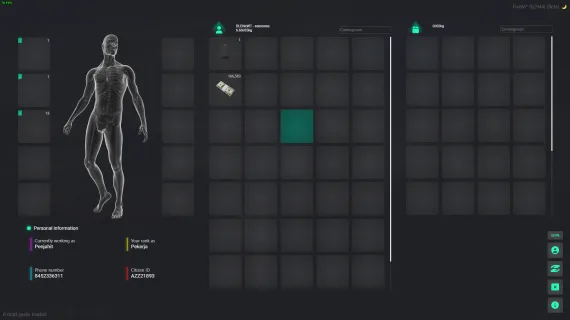
ox_inventory is the functional baseline most servers use. Prodigy 2.0 is what happens when someone rebuilds that baseline around metadata — every item can carry internal data that makes it unique from every other copy of the same item. A weapon with a serial number, a key tied to a specific property, a document with a player's name embedded — these aren't tricks or workarounds, they're native to how this inventory handles items.
What Makes This Different from Standard ox_inventory
The metadata architecture is the core distinction. Where ox_inventory treats two identical items as interchangeable, this rework identifies each item individually through its metadata payload. That unlocks item uniqueness, conditional logic based on item state, and the rarity system — items can be classified across rarity tiers using their metadata, which opens up loot-table logic, collectibles, and quality-tiered gear without custom workarounds.
- Metadata-driven item uniqueness — each item instance carries its own internal data
- Item rarity system configurable via metadata — common through legendary tiers
- Backpack system: players choose whether to use a backpack, with configurable slot and weight modifiers
- Special slot customization — designated hotbar or equipment slots
- Built-in crafting table with dedicated UI — no separate crafting resource required
- Based on ox_inventory v2.43.5 — base script unencrypted; only custom additional functions are in escrow
- Smooth performance optimization throughout
Dependencies
Requires oxmysql. Target system (qb-target or ox_target) is optional. Compatible with qb-core, es_extended, and qbx_core.
Framework Compatibility
ESX, QBCore, and Qbox are all supported with their respective framework hooks pre-built.
The Honest Assessment
If your server uses ox_inventory as-is and you're satisfied, this isn't an upgrade you need. But if you're running workarounds to track unique weapons, building a custom rarity system on top of standard items, or maintaining a separate crafting resource that fights with your inventory — Prodigy 2.0 solves all three in one resource. The escrow covers only the custom additions layered on top; the ox_inventory base you can read and audit yourself.
Installation
- Stop the server and back up the inventory resource you are replacing.
- Copy the new inventory resource into
resources, with oxmysql starting ahead of it. - Add its
ensure line to server.cfg and comment out the line for the inventory it supersedes. - Configure the backpack slot and weight modifiers, the special slots and the rarity tiers.
- Boot the server and check a metadata item, the crafting table and your framework hooks — qb-core, qbx_core or es_extended — before letting players back in. If you use ox_target or qb-target, the optional target integration can be enabled at the same time.


 Sale
Sale