FREE MDT for Police

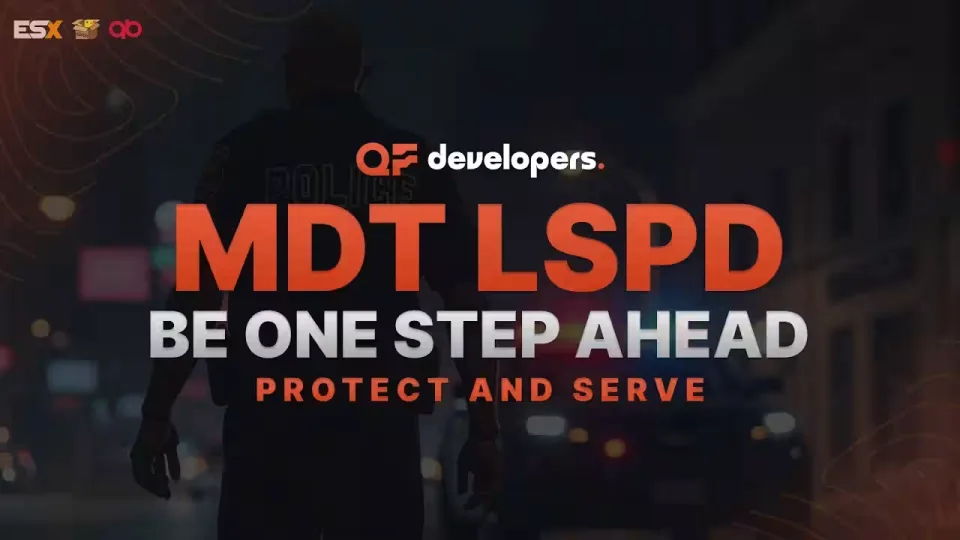
A fully free police MDT for FiveM with warrants, criminal records, vehicle database, auto nearest-player lookup, and five-language support. ESX, QBCore & Qbox. Rated 4.89/5.

3.5 (2 reviews)
esx qbcore qbox
FREE
Secure checkout by Tebex Digital delivery after checkout Tebex Your Game Studio, Extended.
Overview
Reviews 2

A functioning police department on a FiveM server runs on information — who owns which plate, what priors a suspect has, whether there's an active warrant. This MDT puts that database in officers' hands inside the game rather than in a Discord channel or a Google Sheet, which is where it ends up on servers that haven't sorted their law enforcement tooling yet.

The nearest-player search is the feature that saves the most time in practice. Rather than requiring officers to manually type a name or plate they may not have seen clearly, the system pulls up the closest player's record automatically. That kind of UX detail is what separates an MDT that gets used from one that gets opened once and then avoided because the workflow is slower than just asking in voice.

Key Features

  • Report creation with descriptions, involved parties, and photo attachments
  • Warrant system with full detail fields and evidence linking
  • Citizen, vehicle, and residence database searchable from one interface
  • Criminal record lookup with configurable fine and sentencing options
  • Nearest-player auto-fill — no manual name or ID entry required
  • Announcement and service note management for department communications
  • Multi-language support: Polish, English, German, French, Spanish
  • Discord webhook integration for logging MDT activity off-server
  • Modern NUI with dynamic visual customisation options
  • SQL install file included — database tables deploy in one step
  • 0.0ms resource usage at idle

Framework Compatibility

Full support for ESX, QBCore, and Qbox. No paid dependencies. Rated 4.89/5 across nine community reviews — the highest-rated item in this product category.

This is a free script, which means zero budget risk. Install it, configure the job name to match your police faction, run the SQL, and your department has a functioning records system the same session. The multi-language support is genuinely useful if you run a European community — French and German players can work in their native language without needing a separate localised build.

Installation plan

Set up FREE MDT for Police safely

Use the documentation included with the download as the final authority. This plan helps you prepare a rollback, install in the right order, and verify the resource before it reaches players.

Resource type
FiveM script
Compatibility shown
ESX QBCore Qbox
Catalog category
ESX Scripts
Package source
Shop Tebex
  1. Audit the package and requirements

    Open the supplied documentation before moving files or changing the database. Build the install order from the package, not from assumptions.

    • Identify the actual resource folder, required dependencies, and supported framework version.
    • Locate any SQL, configuration examples, permissions, or optional integrations.
    • Check whether the documentation requires a specific start order.

    Ready when Every dependency and required file has a place in your install plan.

  2. Create a rollback point

    Prepare the server so the change can be reversed cleanly if the resource conflicts with your current stack.

    • Keep an untouched copy of the downloaded package.
    • Back up the database and every configuration file you will edit.
    • Use a test server or schedule a maintenance window before changing production.

    Ready when You can restore the previous database, files, and configuration.

  3. Install in the documented order

    Apply only the changes supplied for this resource, keeping dependency and startup order intact.

    • Place the resource folder where your server loads resources, without renaming it unless instructed.
    • Install dependencies first, then import included SQL once and review configuration values.
    • Add the documented resource name to the server startup configuration after its dependencies.

    Ready when The resource starts without missing files, exports, tables, or dependencies.

  4. Verify the complete player flow

    Restart the test server, watch both server and client consoles, and exercise the resource before opening it to players.

    • Test the main workflow with an authorized player and a player without permission.
    • Reconnect and restart once to confirm saved state and startup behavior.
    • Review console output again before promoting the same configuration to production.

    Complete when The intended flow works twice with no new console errors.

Support reference Use the exact listing name when you contact support.
FREE MDT for Police Contact support

FREE MDT for Police compatibility and specs

Frameworks
ESX · QBCore · Qbox
Category
Delivery
After checkout — order download link
Product terms
See product details — terms vary by resource
3.5
2 reviews
5★
0%
4★
50%
3★
50%
2★
0%
1★
0%
T
Tyler R.
Crimson Bay RP

We were managing cop records through Discord channels and a bloated Google Sheet for months because our old script kept throwing SQL errors on QBCore. Replaced it with this last week and it made a huge difference. Had to manually edit the config file to map our custom sheriff job name, but once that was sorted it worked fine.

J
JensSinor VERIFIED
Steel Reef RP

Downloaded this on a whim to test on our dev environment. Performance is clean, sits at 0.00ms at idle and does not impact client FPS when opened. Functionality is solid for what it is, but the NUI style just does not fit the rest of our city layout. Probably going to shelve it for now.

Write a review

Reviews are moderated before appearing. Purchased the product? Your review gets a VERIFIED badge automatically.

20 chars minimum
[ You might also like ]

Related scripts

About this FiveM script

FREE MDT for Police is a FiveM resource for esx, qbcore, qbox servers. Review the product details, requirements, and compatibility notes before ordering.

Use the included files and documentation as the source of truth for installation, configuration, dependencies, and any stated performance information.