FiveM Minigames Bundle by RainMad (rm_minigames)
With a wide variety of minigames — from Quick Time Events and Lockpicks to Typing Games and Safecracking — you can customize difficulty, timing, and rewards to fit your server’s style. Built for ESX, QBCore, and all frameworks, this pack is lightweight, efficient, and packed with options to make your server stand out.
The FiveM Minigames Bundle by RainMad brings together all the most popular and fun minigames in one resource. Perfect for robberies, hacking, lockpicking, and interactive RP situations, this bundle is designed to give your players engaging challenges while keeping everything optimized and easy to integrate.
Highlights:
- Special sound effects and immersive gameplay
- Optimized performance (0.00ms idle usage)
- Works with all major frameworks (ESX, QBCore, etc.)
- Fully customizable difficulty and settings
- Easy to integrate with your server’s scripts
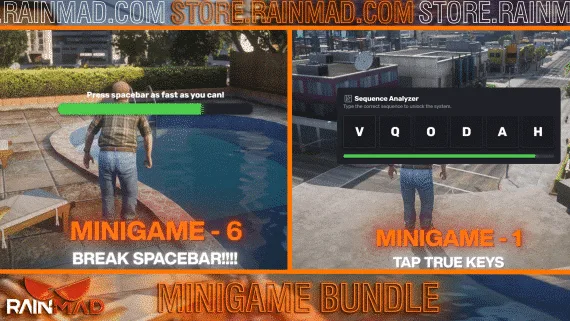
- Includes 15+ minigames (QTE, lockpicks, safecrack, hotwire, typing game, fingerprint, and more)
Features of FiveM Minigames Bundle by RainMad :
○ This resource is running at idle with 0.00ms.
○ This resource is using Asset Escrow System by FiveM.
○ Some of the files are open for notifications and many editable things. (editable_client.lua & editable_server.lua)
○ You can use this resource on ALL servers.
○ Each minigame includes its own special sound effects.
○ You can set time and easy, medium, hard difficulty sections for each minigame from cfg.lua.
○ You can change error allowance and the number of locks for this minigame. exports[‘rm_minigames’]:multipleLockpick
○ You can choose difficulty for this minigame.
exports[‘rm_minigames’]:memoryGame
○ You can change error allowance and difficulty level for this minigame. exports[‘rm_minigames’]:timedButton
○ You can change error allowance, success count and difficulty level for this minigame. exports[‘rm_minigames’]:timedBar
○ You can choose the error allowance, difficulty level, and maximum score for this minigame.
exports[‘rm_minigames’]:circleClick
○ You can choose decay rate and increment rate for this minigame. exports[‘rm_minigames’]:buttonMashing
○ You can choose password length and live for this minigame.
exports[‘rm_minigames’]:hackerMinigame
○ You can choose difficulty for this minigame.
exports[‘rm_minigames’]:safeCrack
○ You can choose time for this minigame.
exports[‘rm_minigames’]:hotwireHack
○ You can choose time and hearth for this minigame.
exports[‘rm_minigames’]:fingerPrint
○ You can choose difficulty and duration for this minigame.
exports[‘rm_minigames’]:typingGame
○ You can choose speed for this minigame.
exports[‘rm_minigames’]:timedLockpick
○ You can choose lock count for this minigame.
exports[‘rm_minigames’]:timedAction
○ You can choose difficulty for this minigame.
exports[‘rm_minigames’]:quickTimeEvent
○ You can choose difficulty for this minigame.
exports[‘rm_minigames’]:combinationLock
○ You can choose difficulty for this minigame.
exports[‘rm_minigames’]:angledLockpick
○ Minigame Bundle has most popular minigames for your
○ Quick Time Event
○ Timed Press
○ Timed Lockpick
○ Typing Game
○ Fingerprint
○ Hotwire
○ Safecrack
○ Crack Password
Showcase :
Framework Compatibility
ESX, QBCore and Qbox are all covered, and the bundle runs alongside other frameworks too. There is nothing else to install — the minigames are self-contained.
Installation
- Place the resource in
resources. - Add an
ensure line for it high in server.cfg, above the scripts that will call the minigames. - Set difficulty, timing and rewards per minigame in the config to match how demanding you want robberies and hacks to feel.
- Restart, then fire one minigame from a script you already run and check the result comes back correctly.

 Sale
Sale