
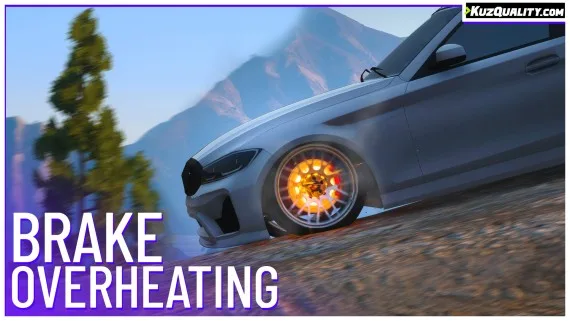


Brake Overheating
Realistic brake heat mechanics for FiveM — temperature-based brake fade, synchronized caliper glow, and brake upgrade integration. Standalone compatible, 0.00ms idle, works on all vehicles including mods.
Shelved in ESX Scripts110 products on this shelf QBCore Scripts119 products on this shelf Qbox Scripts120 products on this shelf
$9.00
Secure checkout by Tebex
Digital delivery after checkout
Tebex
Your Game Studio, Extended.
Overview
Reviews
Driving physics in GTA V are already a step above most sandbox games, but brakes never had any cost to them — you could jam the pedal at 200km/h corner after corner with zero consequence. This script changes that. Brake temperature is now a real variable: push them too hard and they overheat, glow visibly, and lose stopping power until they cool down.
How the Heat Model Works
Aggressive braking and high-speed deceleration raises brake temperature over time. Once that temperature crosses the threshold, two things happen: the brake calipers begin to glow with a heat effect visible to other players, and braking power starts to fade — the harder your brakes are cooked, the longer it takes to actually stop. Back off and let them cool down to restore full performance. The heat-up and cooldown rates are tuned to feel realistic rather than punishing, and the timing is synchronized across the session so other players see the same glow state.
- Temperature-driven brake fade — overheated brakes genuinely stop less effectively
- Visual glow effect on heated calipers, synchronized across all players
- Realistic heat-up and cooldown timing configurable per server
- Brake upgrades have real mechanical meaning — upgraded brakes heat slower and cool faster
- Works on all vehicles including modded cars and bikes
- Highly configurable — thresholds, timing, and visual intensity all adjustable
- Resource usage: 0.00ms idle, 0.01–0.02ms in-vehicle, peaks at 0.05–0.08ms with multiple hot vehicles nearby
Brake Upgrades Actually Mean Something Now
Without a heat model, the brake upgrade in the mod shop is a throwaway stat. With this script, upgraded brakes dissipate heat faster and take longer to reach the fade threshold — which makes the upgrade a genuine performance decision for racing servers or any server where sustained high-speed driving matters. That's a meaningful layer of depth added to your economy without any extra scripting work.
Framework Compatibility
Fully standalone — no framework required. Also tested and compatible with ESX, QBCore, Qbox, vRP, and TMC. Drop it into your resources folder and it runs. The resmon figures hold at 0.00ms at idle and stay well under 0.10ms even with multiple vehicles active, so it won't register as a meaningful performance cost on any reasonably optimized server.
Installation
- Unpack the download and place the resource folder in your server's
resourcesdirectory. - Add an
ensureline for it toserver.cfg. - Restart the server, then brake hard from speed a few times and watch for the caliper glow.
- Adjust the heat-up and cooldown rates in the config if you want fade arriving sooner or later than the defaults do.
- Check with a second player nearby that the glow state matches on both clients before you leave it running live.
Installation plan
Set up Brake Overheating safely
Use the documentation included with the download as the final authority. This plan helps you prepare a rollback, install in the right order, and verify the resource before it reaches players.
- Resource type
- FiveM script
- Catalog category
- ESX Scripts
- Package source
- KuzQuality Tebex
-
Audit the package and requirements
Open the supplied documentation before moving files or changing the database. Build the install order from the package, not from assumptions.
- Identify the actual resource folder, required dependencies, and supported framework version.
- Locate any SQL, configuration examples, permissions, or optional integrations.
- Check whether the documentation requires a specific start order.
Ready when Every dependency and required file has a place in your install plan.
-
Create a rollback point
Prepare the server so the change can be reversed cleanly if the resource conflicts with your current stack.
- Keep an untouched copy of the downloaded package.
- Back up the database and every configuration file you will edit.
- Use a test server or schedule a maintenance window before changing production.
Ready when You can restore the previous database, files, and configuration.
-
Install in the documented order
Apply only the changes supplied for this resource, keeping dependency and startup order intact.
- Place the resource folder where your server loads resources, without renaming it unless instructed.
- Install dependencies first, then import included SQL once and review configuration values.
- Add the documented resource name to the server startup configuration after its dependencies.
Ready when The resource starts without missing files, exports, tables, or dependencies.
-
Verify the complete player flow
Restart the test server, watch both server and client consoles, and exercise the resource before opening it to players.
- Test the main workflow with an authorized player and a player without permission.
- Reconnect and restart once to confirm saved state and startup behavior.
- Review console output again before promoting the same configuration to production.
Complete when The intended flow works twice with no new console errors.
Support reference
Use the exact listing name when you contact support.
Brake Overheating
Contact support
Brake Overheating compatibility and specs
Category
Creator
Delivery
After checkout — order download link
Product terms
See product details — terms vary by resource
No reviews yet — be the first to write one.
Write a review
Reviews are moderated before appearing. Purchased the product? Your review gets a VERIFIED badge automatically.
[ You might also like ]
Related scripts

- ESX
- QBCore
- Qbox
Drug Manufacturing Jobs (Gang Integration)
Complete FiveM drug operation script for ESX, QBCore, and Qbox — upgradeable labs, burner phone dark web sourcing, multi-drug production, built-in money laundering, and 0.00ms server load.
$20.00

- ESX
- QBCore
- Qbox
Optimized Anticheat FiveM
Server-side FiveM anticheat with 841 blocked models, multi-identifier banning, event protection, and entity spam limits. No client component. Framework-free. Refined over 5 years.
$9.00
 Sale
Sale
 Sale
Sale
- ESX
- QBCore
- Qbox
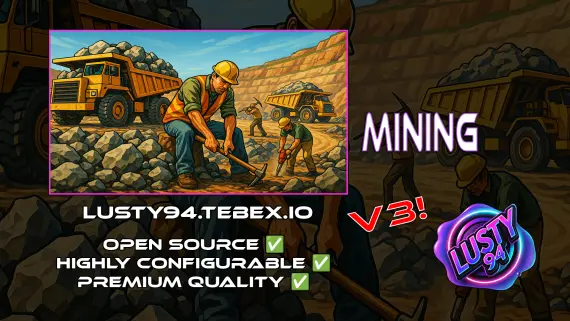
Mining Job V3
Free open source FiveM mining job for ESX, QBCore and Qbox — four-stage chain from raw rock to smelted ore to crafted jewelry, with tool durability, quests, coal delivery missions, and a live XP leaderboard.
FREE

- ESX
- QBCore
- Qbox
Custom Shops Pro
Custom Shops Pro is a full player-owned shop system for FiveM with loyalty tiers, coupon campaigns, pawn and dirty money support, 55+ staff permissions, and deep analytics across ESX, QBCore, and QBox.
FREE
- ESX
- QBCore
- Qbox
Vehicle Shops
QBCore dealership script with public showrooms — test drives, financing, license checks — and player-owned operations with stock ordering, employee commissions, and sell-back. Tested with ox_lib, oxmysql, and major banking/inventory resources.
$15.00
 Sale
Sale
 Sale
Sale
- ESX
- QBCore
- Qbox
FiveM Pet System
Dynamic pet system featuring leveling, breeding, and over 400 accessories
$15.00

About this FiveM script
Brake Overheating is a FiveM resource for esx, qbcore, qbox servers. Review the product details, requirements, and compatibility notes before ordering.
Use the included files and documentation as the source of truth for installation, configuration, dependencies, and any stated performance information.