
Realistic Offroad Physics
Shelved in ESX Scripts110 products on this shelf QBCore Scripts119 products on this shelf Qbox Scripts120 products on this shelf
$20.00
Secure checkout by Tebex
Digital delivery after checkout
Tebex
Your Game Studio, Extended.
Overview
Reviews
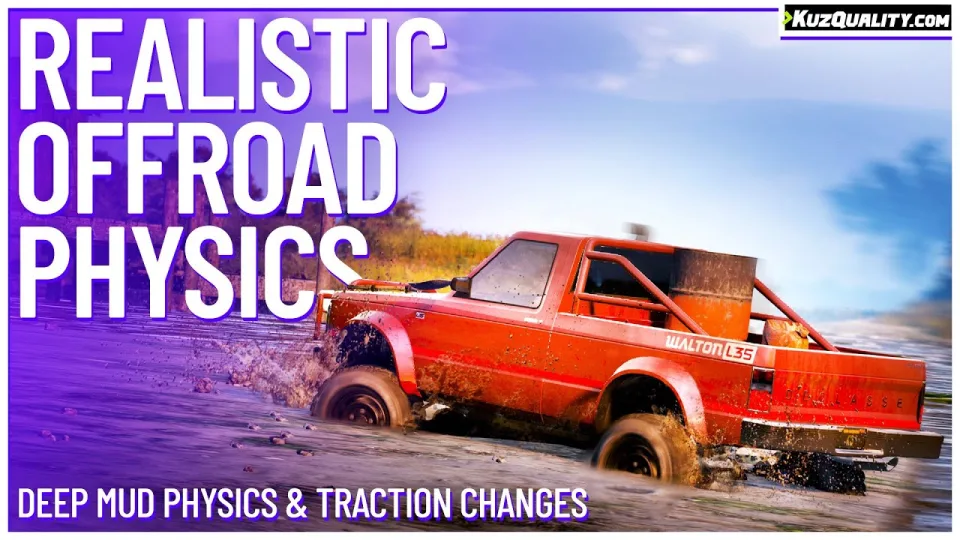
This script brings realistic offroad driving dynamics to your FiveM server by restricting standard vehicles on difficult terrain. Vehicles visually sink into mud, sand, dirt, and soft surfaces, making off-roading impossible without appropriate vehicles and setups. Each surface material operates on distinct parameters for traction, softness, and depth.
Calculation Factors
Off-road vehicle performance is dynamically calculated using these factors:
- Wheel size
- Suspension height
- Vehicle weight
- Driven wheels (AWD or not)
- Vehicle class
- Wheel count
- Off-road tires
- Weather
Core Mechanics
- Traction: Defines surface grip. Low traction reduces acceleration, braking, and turning, leading to skidding on materials like gravel or rocks.
- Softness: Affects how quickly vehicles sink. Harder surfaces like gravel slow sinking, while soft surfaces like wet sand or mud cause rapid sinking.
- Depth: Determines how deep vehicles sink into a surface. Deeper sinking increases driving difficulty and can leave vehicles stuck in mud or wet sand.
Feature Overview
- Visual vehicle sinking on soft ground
- Loss of traction on slippery surfaces
- Realistic handling behavior for each vehicle class
- Low resource usage with optimized player synchronization
- Fully standalone with zero required dependencies
- Deeply configurable material settings
- Does not modify vehicle runtime
handling.metafiles, maintaining compatibility with custom vehicle resources - Allows server owners to enforce off-road driving limits naturally without manual staff rules
Compatibility
Works out of the box on all FiveM server setups:
- ESX
- QBCore
- Qbox
- vRP
- Standalone
Installation
- Place the resource folder in your server's
resourcesdirectory. - Add an
ensureline for it inserver.cfg. - Restart the server, then drive a standard vehicle onto mud or sand to confirm the sinking behaviour applies.
- Tune the traction, softness and depth values per surface material until the handling suits your map.
Requirements
Nothing else is needed. The resource is standalone and reads what it needs from the vehicle itself — wheel size, suspension height, weight, driven wheels, class and tyres — so an ESX, QBCore or Qbox server behaves identically.
Installation plan
Set up Realistic Offroad Physics safely
Use the documentation included with the download as the final authority. This plan helps you prepare a rollback, install in the right order, and verify the resource before it reaches players.
- Resource type
- FiveM script
- Catalog category
- ESX Scripts
- Package source
- KuzQuality Tebex
-
Audit the package and requirements
Open the supplied documentation before moving files or changing the database. Build the install order from the package, not from assumptions.
- Identify the actual resource folder, required dependencies, and supported framework version.
- Locate any SQL, configuration examples, permissions, or optional integrations.
- Check whether the documentation requires a specific start order.
Ready when Every dependency and required file has a place in your install plan.
-
Create a rollback point
Prepare the server so the change can be reversed cleanly if the resource conflicts with your current stack.
- Keep an untouched copy of the downloaded package.
- Back up the database and every configuration file you will edit.
- Use a test server or schedule a maintenance window before changing production.
Ready when You can restore the previous database, files, and configuration.
-
Install in the documented order
Apply only the changes supplied for this resource, keeping dependency and startup order intact.
- Place the resource folder where your server loads resources, without renaming it unless instructed.
- Install dependencies first, then import included SQL once and review configuration values.
- Add the documented resource name to the server startup configuration after its dependencies.
Ready when The resource starts without missing files, exports, tables, or dependencies.
-
Verify the complete player flow
Restart the test server, watch both server and client consoles, and exercise the resource before opening it to players.
- Test the main workflow with an authorized player and a player without permission.
- Reconnect and restart once to confirm saved state and startup behavior.
- Review console output again before promoting the same configuration to production.
Complete when The intended flow works twice with no new console errors.
Support reference
Use the exact listing name when you contact support.
Realistic Offroad Physics
Contact support
Realistic Offroad Physics compatibility and specs
Category
Creator
Delivery
After checkout — order download link
Product terms
See product details — terms vary by resource
No reviews yet — be the first to write one.
Write a review
Reviews are moderated before appearing. Purchased the product? Your review gets a VERIFIED badge automatically.
[ You might also like ]
Related scripts
- ESX
- QBCore
- Qbox
Advanced Wheel Boot
A multiplayer-synchronised FiveM wheel boot script with real steering restriction, optional wheel-damage physics, lockpick removal, and 0.00ms idle. ESX, QBCore, and Qbox compatible.
$12.99
 Sale
Sale
- ESX
- QBCore
- Qbox
Realistic Slaughtering Job /w Animations
FiveM slaughterhouse job with a full catch-to-grind processing chain, XP-gated success rates, dynamic market pricing, and dual delivery options for ESX, QBCore and Qbox servers.
$15.00
$30.00
- QBCore
- Qbox
QBCore Framework V4
QB Core V4 FiveM server on build 1.2.6 — crypto mining, gun dealer, black market, Cayo Island, PMA-voice, Discord webhooks, and a full civilian and criminal economy out of the box.
$100.00
- ESX
- QBCore
- Qbox
FiveM Pepperspray Script
Adds a job-restricted pepper spray addon weapon to FiveM with configurable cone, range, paralysis duration, and gas mask immunity. ESX, QBCore, Qbox. Under 0.03ms at peak.
$15.00
 New
New
- ESX
- QBCore
- Qbox
Outfit Items
FiveM outfit items script with job and grade-based access, live character previews, and wearable inventory items that apply full uniforms instantly. QBCore, ox_inventory, ox_target ready.
$6.00
 New
New
- ESX
- QBCore
- Qbox
FREE Tackle Script
Free FiveM tackle script with 0.00ms idle and 0.03ms active cost. Hold G to sprint, release to lunge — contact required to ragdoll a player. Standalone, unencrypted, ESX/QBCore/Qbox/Gamzky compatible.
FREE

About this FiveM script
Realistic Offroad Physics is a FiveM resource for esx, qbcore, qbox servers. Review the product details, requirements, and compatibility notes before ordering.
Use the included files and documentation as the source of truth for installation, configuration, dependencies, and any stated performance information.