
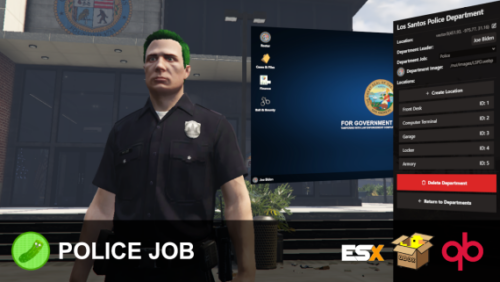
Pickle’s Police Job | In-Game Creator
Features
Police Tools
- Grappler, Stab Sticks, Object Placer, NVG / Thermal Goggles, Snakecams, Shields
Evidence
- Reconstruct scenes by printing cases out and enabling the Reconstruct Scene mode – see the entire case’s evidence outlined in the world for you to put together the pieces.
- BAC, GSR, Fingerprint, and Blood Testing all output as evidence reports as well after they are performed to be used in the report. Meaning you can prove their BAC etc was at the level specified at a later date without clipping software.
- Collect evidence in the world using the Evidence Camera – scan bullets, blood, vehicles, and take photos; they will all save into a evidence report that can be imported into the Computer Terminal for cases.
Computer Terminal (Cases & Files)
- Write summaries with a modern text editor that supports embedded images, video, and text.
- Import Evidence Reports (more on this in Evidence section)
- Add, edit, and remove cases and evidence for cases.
Computer Terminal (Roster)
- Clocking on & off duty also doesn’t require the framework job to be set – it will handle it automatically and set you to unemployed when clocking off.
- You don’t need to add a custom job for each department, you can use all of them as “police” in QB / ESX as it will only pull department data from my resource.
- Ranks can be organized as they wish, no framework ties at all besides setting their framework grade number (0-4, editable per framework job via config.lua)
- Permissions are used to assign specific perms for officers like Rifle Certified, Air Certified, etc – and it affects armories and garages perms.
- Add, Manage, and Remove ranks, members, and permissions.
Front Desk
- View recent duty logs (for the officer who’s using it)
- Clock on & off Duty (You can only do this at the front desk, let me know where else this needs to be possible)
- Apply for Department
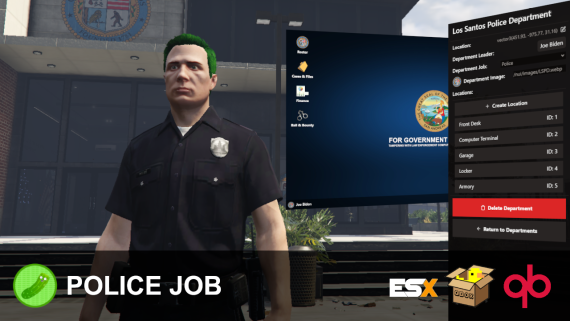
In-Game Creation of Departments
- Armories and Garages are restrictable by the chief of police to be only allowed under permissions / ranks (e.g. Rifle Certified, Air Certified, etc)
- Set department logo, title, and leader (Chief of Police).
- Add, Edit, and Remove Locations for: Armories, Garages, Computer Terminals, Front Desks, and Lockers.
What is this?
Enjoy everyone!
With modern police tools like grapplers, stab sticks, and a fully built-in evidence & cases system – this is the most complete police job you’ll find on the platform.
The days where you need to add framework jobs and setup compatibility with multiple scripts are over. All departments can run under the same framework job, or different jobs – it’s that easy.
This is the first ever in-game police job creator, where you’ll be able to create, manage, and run multiple departments in-game.
Requirements
- (Optional, for Evidence): Any metadata-supported inventory (ox_inventory, qb-inventory, etc)
- Ox Lib (Required, Works anywhere).
- ESX (1.1+) / QBox / QB. The bridge is open for you to create / edit integration for frameworks.
Credits
- Envi Scripts for creating exports in
envi-addictionsto allow support for police jobs. - RogueThunder for creating and giving permission to use their grappler model.
- NukePUG for helping create the stab-stick prop and grappler rope.
Showcase
Installation
Follow the steps outlined in the docs, very easy to setup!

![[200] Tattoo Pack for FiveM Servers | Supports qb and esx](https://scripts-tebex.io/wp-content/uploads/e73d9e860085a63ed71ca78e292331740ea973c4-scaled-1.png)
![Full Drugs Package [Processing + Sales]](https://scripts-tebex.io/wp-content/uploads/858ac079f079303eb2f86277eaf784af2b2eb76f.jpg)
![Latest QBCore Framework V7 [NoPixel 4.0 Inspired]](https://scripts-tebex.io/wp-content/uploads/QBCore-Framework-V7.png)
James Clark (verified owner) –
The in-game department creator is a total game-changer and saves me so much time compared to editing config files. I really love the evidence reconstruction feature and the inclusion of tools like the grappler. However, it’s a bit frustrating that clocking on and off is restricted only to the front desk. It’s a solid resource, but it still feels like it needs a few more polish passes to be perfect.
James Clark (verified owner) –
The in-game department creator is a total game-changer and saves me so much time compared to editing config files. I really love the evidence reconstruction feature and the inclusion of tools like the grappler. However, it’s a bit frustrating that clocking on and off is restricted only to the front desk. It’s a solid resource, but it still feels like it needs a few more polish passes to be perfect.
Lizzie Delaney (verified owner) –
The in-game department creator is a really cool concept and saves a lot of time on the config side. I love the evidence system and the tools provided, but I’ve run into a few bugs when managing ranks. It feels a bit unfinished in some areas, and the documentation could be clearer. Overall, it’s decent, but needs more polish to be perfect.
Lizzie Delaney (verified owner) –
The in-game department creator is a really cool concept and saves a lot of time on the config side. I love the evidence system and the tools provided, but I’ve run into a few bugs when managing ranks. It feels a bit unfinished in some areas, and the documentation could be clearer. Overall, it’s decent, but needs more polish to be perfect.