Metal Detecting

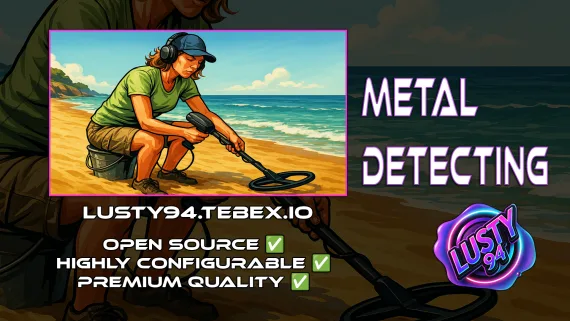
FiveM metal detecting script covering 8 named beach and coastal zones with 20 discoverable items, detector overheating for natural pacing, and configurable loot rates. ESX, QBCore, Qbox. Solo leisure content for £5.

5.0 (2 reviews)
esx qbcore qbox
$5.00
Secure checkout by Tebex Digital delivery after checkout Tebex Your Game Studio, Extended.
Overview
Reviews 2

Not every activity on a roleplay server needs a team, a timer, or a rival. Metal detecting is what players do between sessions — wandering a beach, listening for beeps, digging up whatever the ground is hiding. It runs at its own pace, earns items with real economy value, and doesn't require a coordinator or a mission start. That makes it one of the few scripts that keeps the world feeling inhabited even at low player counts.

Eight Named Locations Across the Map

The script ships with pre-defined zones at eight distinct locations: Cypress Flats Beach, Paleto Beach, Zancudo Swamp, Great Ocean Highway, Los Santos Airport Beach, Vespucci Pier, Vespucci Beach, and the Great Ocean Highway stretch. Having eight named spots means players aren't all farming the same patch — there's genuine geographic variety, and the server doesn't develop a single "meta spot" that everyone knows about and fights over.

Loot Table and Item Discovery

Twenty discoverable items split across two tiers: eight rare items (Gold Ring, Diamond Ring, and equivalents) and twelve common items (coins, cans, assorted junk). The rare/common split keeps rewards honest — common items keep the activity from being a dead end, and rare drops create genuine moments when they surface. Loot rates are fully configurable in the config file.

  • 8 pre-defined beach and coastal detection zones
  • 20 discoverable items — 8 rare, 12 common — with configurable drop rates
  • Metal detector overheating system — enforces natural session pacing
  • Optional audio cues on item discovery
  • Server-side item checks to prevent client-side exploit duplication
  • Fully configurable loot rates and detection area mechanics
  • Target support: ox_target, qb-target
  • Inventory support: ox_inventory, qb-inventory
  • Notification support: ox_lib, mythic_notify, okokNotify, qb-core notify
  • Framework support: ESX, QBCore, Qbox

The Overheating System as a Pacing Mechanic

Metal detectors overheat during extended use. That's not an artificial grind timer — it's a natural ceiling that stops one player from farming a location for hours uninterrupted. Players sweep an area, let the detector cool, move to a different zone, and return. The rhythm of that loop suits the activity: it's a casual pastime, not a job, and the overheating mechanic enforces that without heavy-handed restrictions.

Dependencies and Server Requirements

Requires ox_lib, polyzone, qb-core, qb-inventory, and qb-target. At £5 for a solo leisure activity that populates your coastline with player-driven exploration, it fills a content gap that most job and crime scripts leave untouched — something to do that doesn't demand coordination or high stakes.

Installation plan

Set up Metal Detecting safely

Use the documentation included with the download as the final authority. This plan helps you prepare a rollback, install in the right order, and verify the resource before it reaches players.

Resource type
FiveM script
Compatibility shown
ESX QBCore Qbox
Catalog category
ESX Scripts
Package source
Shop Tebex
  1. Audit the package and requirements

    Open the supplied documentation before moving files or changing the database. Build the install order from the package, not from assumptions.

    • Identify the actual resource folder, required dependencies, and supported framework version.
    • Locate any SQL, configuration examples, permissions, or optional integrations.
    • Check whether the documentation requires a specific start order.

    Ready when Every dependency and required file has a place in your install plan.

  2. Create a rollback point

    Prepare the server so the change can be reversed cleanly if the resource conflicts with your current stack.

    • Keep an untouched copy of the downloaded package.
    • Back up the database and every configuration file you will edit.
    • Use a test server or schedule a maintenance window before changing production.

    Ready when You can restore the previous database, files, and configuration.

  3. Install in the documented order

    Apply only the changes supplied for this resource, keeping dependency and startup order intact.

    • Place the resource folder where your server loads resources, without renaming it unless instructed.
    • Install dependencies first, then import included SQL once and review configuration values.
    • Add the documented resource name to the server startup configuration after its dependencies.

    Ready when The resource starts without missing files, exports, tables, or dependencies.

  4. Verify the complete player flow

    Restart the test server, watch both server and client consoles, and exercise the resource before opening it to players.

    • Test the main workflow with an authorized player and a player without permission.
    • Reconnect and restart once to confirm saved state and startup behavior.
    • Review console output again before promoting the same configuration to production.

    Complete when The intended flow works twice with no new console errors.

Support reference Use the exact listing name when you contact support.
Metal Detecting Contact support

Metal Detecting compatibility and specs

Frameworks
ESX · QBCore · Qbox
Category
Delivery
After checkout — order download link
Product terms
See product details — terms vary by resource
5.0
2 reviews
5★
100%
4★
0%
3★
0%
2★
0%
1★
0%
M
Marcus K. VERIFIED
Solstice RP

had a little trouble setting up the dependencies with qbox on our test box because i missed one export in the docs... opened a ticket in their discord and the dev sorted it out for me in like ten minutes. very happy with how it runs now, players are using it at vespucci beach all day.

k
konflict60 VERIFIED
Ironhold RP

our main dev told me to pick this up last week so people had something chill to do when numbers are low instead of just standing around the pier. installed it on qbcore without any issues and the response from the community has been surprisingly good. people actually walk up and down paleto beach and zancudo swamp searching for coins and rings now instead of grinding the usual jobs. the overheating mechanic is a nice touch too because it stops guys from just macroing the search overnight. for five pounds it is honestly worth every penny and adds a bit of life to the coastlines that we were missing before.

Write a review

Reviews are moderated before appearing. Purchased the product? Your review gets a VERIFIED badge automatically.

20 chars minimum
[ You might also like ]

Related scripts

About this FiveM script

Metal Detecting is a FiveM resource for esx, qbcore, qbox servers. Review the product details, requirements, and compatibility notes before ordering.

Use the included files and documentation as the source of truth for installation, configuration, dependencies, and any stated performance information.